


Featured Projects
|
The field of Human-Computer Interaction has long engaged in creating and studying online tools that serve as information resources. However, few studies explore how people, particularly underserved populations, find these tools. This study examines the role that online search plays in the access to online information resources using access to online Computer Science (CS) education as a case study. First, we conduct a survey with U.S. parents to identify terms used to search for online CS education. Second, we look at the search results for those terms. |
OrderUp! takes health-related gaming in a new direction and seeks to educate players about how to make healthy eating choices in situations nearly everyone encounters regularly in their lives. By casting players as virtual restaurant servers, OrderUp! forces players to make healthy and fast menu decisions for a group of demanding, impatient customers. OrderUp! was originally developed as a simple, casual game on Nokia N95 mobile phones. 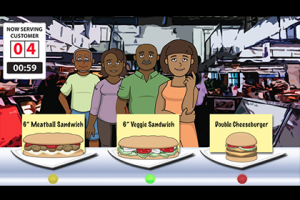 |
We present three prototypes designed for a hypothetical museum exhibit that elicit historical and experiential qualities of early 16th-century prayer-nuts. As personal religious experiences included a “dependence of spirituality on material objects” during the 16th-century, we believe that digitally-enhanced multisensory interactions can help situate the artifact in its historical context. The 3D printed interactive prayer nuts augmented with audio-visual effects support the visual voyage, experience of spirituality, and scents of power. 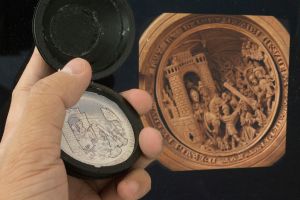 |
About GVU

RESEARCH
23 Core Areas

PEOPLE
300 Researchers

PROJECTS
250 Current

LABS
80 Partners

FUNDING
$9 Million in Grants
GVU Resource Labs

App Lab
Built for Success
A mobile computing "hackerspace."
Visit the App Lab website
Location: TSRB 333

GVU Prototyping Lab
From Concept to Creation
A rapid prototyping "makerspace."
Visit the Prototyping Lab website
Location: TSRB Basement

GVU Craft Lab
Making for All
A soft-goods "makerspace."
Visit the Craft Lab website
Location: TSRB 225B

Usability Lab
Testing Methods and Technology
An adaptable project testing space.
Visit the Usability Lab website
Location: TSRB 216
